oTree Forum >
Insert images in radio button choices
#1 by Blissong1215
Hello everyone,

I attempted to include images within radio button choices by following the example provided in this link: https://s3.amazonaws.com/otreehub/browsable_source/1e38462b-46c7-4ca1-bca5-536462f90131/image_choices/index.html.

However, I encountered an error message that reads "FileNotFoundError: static/positionA6.png."

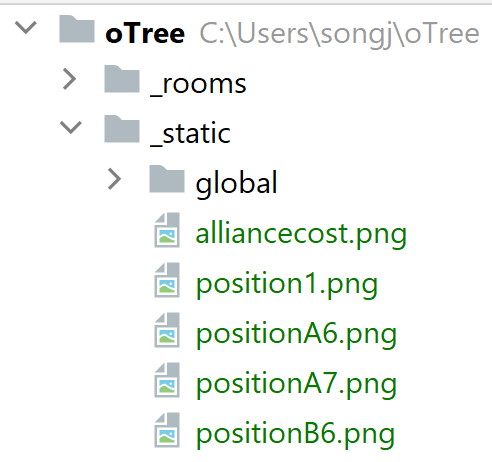
To provide more clarity, I inserted two images, namely "positionA6" and "positionB6," into the static folder (you can refer to the screenshot of the "static.png"). To achieve this, I used the following code:

In '_init_.py':

from otree.api import *

def make_image_data(image_names):
    return [dict(name=name, path='static/{}'.format(name)) for name in image_names]

class Constants(BaseConstants):
    name_in_url = 'choice_images'
    players_per_group = None
    num_rounds = 1

...

class Player(BasePlayer):
    img_choice = models.StringField()

# PAGES
class MyPage(Page):
    form_model = 'player'
    form_fields = ['img_choice']

    @staticmethod
    def vars_for_template(player: Player):
        image_names = [
            'positionA6.png',
            'positionB6.png',
        ]
        return dict(image_data=make_image_data(image_names))
...

In 'MyPage.html':

 <p>Choose your favorite image.</p>
    {{ for image in image_data }}
        <label style="text-align: center">
            <img src="{{ static image.path }}" width="200px">
            <br>
            <input type="radio" name="img_choice" value="{{ image.name }}" class="persist">
        </label>
    {{ endfor }}
    {{ formfield_errors 'img_choice' }}

    <br>
    {{ next_button }}

    <script src="{{ static 'persist-raw.js' }}"></script>

Could someone please assist me in identifying where I should make revisions to the code? Your help is greatly appreciated!

Sincerely,
Jian
#2
by
BonnEconLab

If you put the images in _static/global, then you need to use

def make_image_data(image_names):
    return [dict(name = name, path = 'global/{}'.format(name)) for name in image_names]

That is, simply replace 'static/{}' by 'global/{}'.

See also the recommendations
https://otree.readthedocs.io/en/latest/misc/advanced.html#static-files. If you follow these recommendations and put the images in a folder _static/your_app_name or in a local folder, i.e., your_app_name/static/your_app_name, then you need to use

def make_image_data(image_names):
    return [dict(name = name, path = 'your_app_name/{}'.format(name)) for name in image_names]
#3 by Blissong1215
Yes, the solution worked once I made the necessary path revisions. Thank you!

Sincerely,
Jian