oTree Forum >
Uncaught ReferenceError: liveSend is not defined
#1
by
nicolas
 (edited )
Hello everyone.

I'm currently using oTree Studio and trying to send timestamps to the server using liveSend, but each time I see in the console that liveSend is not defined. Unfortunately I do not know what I am doing wrong.

Below is one thing I tried, this goes into the {{ block content }} of a page:

----

{{ formfields }}

{{ include_sibling 'questiontimer.html' }}

----

and the questiontimer.html:

<style>
    .otree-title {
        visibility: hidden;
    }

    .otree-timer {
        visibility: hidden;
    }

    ._formfield {
        visibility: hidden;
    }
</style>

<script>
    function sendTimestamp(type) {
        let timestamp = new Date().toISOString();
        let dataToSend = {};
        dataToSend[type] = timestamp;
        liveSend(dataToSend);
        console.log("dataToSend:", dataToSend);
    }

    document.addEventListener("DOMContentLoaded", function (event) {
        $('.otree-timer__time-left').on('update.countdown', function (event) {
            if (event.offset.totalSeconds === 10) {
                $('.otree-title').css('visibility', 'visible');
                $('.otree-timer').css('visibility', 'visible');
                $('._formfield').css('visibility', 'visible');
                sendTimestamp('timestamp_question_displayed');
            }
        });

        // when an answer is selected
        $("input[type='radio']").change(function() {
            sendTimestamp('timestamp_answer_selected');
        });
    });
</script>
#2
by
Trontatuma
Seems like liveSend is not defined on the back end?
#3
by
nicolas
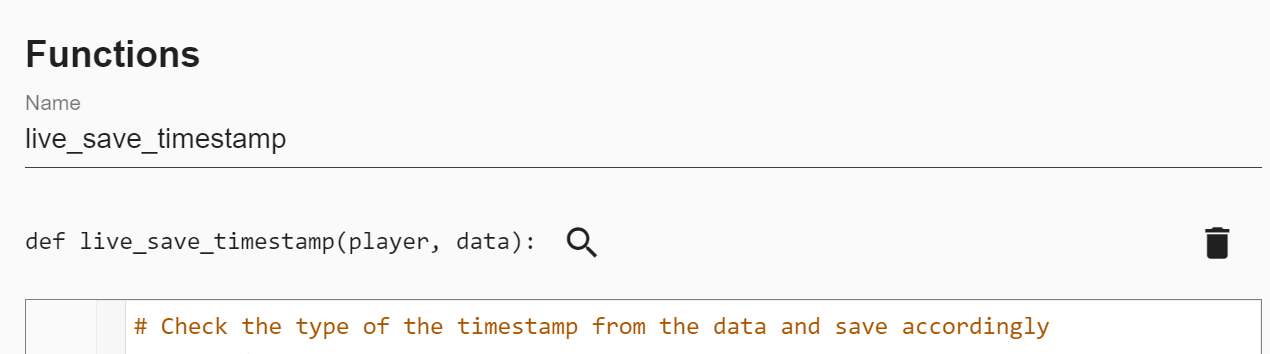
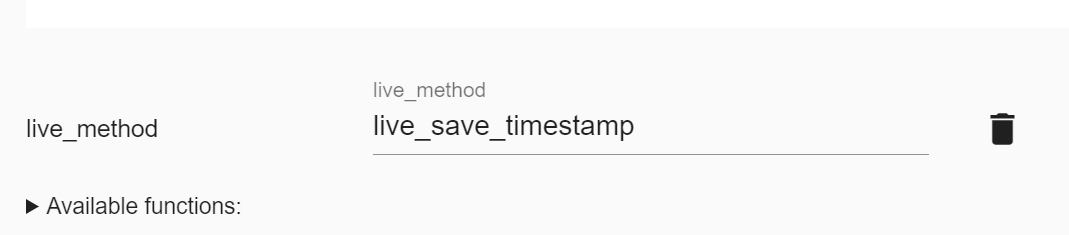
Hi, yes, exactly the problem was that in oTree Studio, on the page where I want to call liveSend, I had to reference the corresponding live_method, which I had previously defined in the player model, see the attached screenshots.
With this step, liveSend works.